
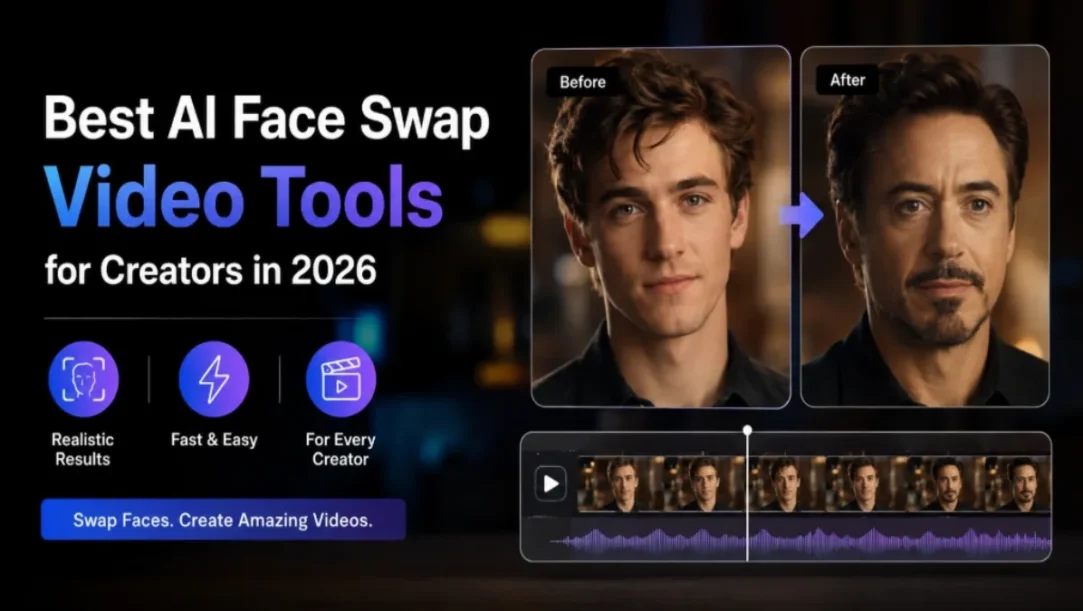
In 2026, AI face swap video tools have become more useful for video editors, marketers, and creators; honestly, it’s been a bit of a change. They don’t necessarily need complicated video editing skills, just to swap faces inside original footage, and then make and share social media material.
People are also using them for creative iterations of video, to help polish or upgrade digital campaigns. But there are differences depending on realism, video quality, processing time, ease, and the free usage of results.
The best of both worlds is Magic Hour- realistically swapped faces with a much broader AI content creation workflow! However, there are a few other tools available to consider based on the need.
Best AI Face Swap Video Tools at a Glance
| Tool | Best For | Video Face Swap | Free Option | Platform | Key Strength |
| Magic Hour | Overall best | Yes | Yes | Web | Quality and creative workflow |
| AKOOL | Marketing content | Yes | Limited | Web | Commercial video creation |
| HeyGen | Business videos | Yes | Yes | Web | AI avatars |
| DeepSwap | Dedicated face swapping | Yes | Limited | Web | Video face swapping |
| Vidnoz | Beginners | Yes | Yes | Web | Simple interface |
| Remaker AI | Quick edits | Yes | Limited | Web | Easy creative tools |
| Reface | Social content | Yes | Limited | Mobile/Web | Fast templates |
| FaceFusion | Technical users | Yes | Open-source | Desktop | Local control |
1. Magic Hour — Best Overall
Magic Hour earns the #1 position because it combines realistic face swapping with a broader set of AI creation tools. Its video face swap tool supports both single and multiple-face workflows and can process common video formats directly in the browser.
Creators can also move between different AI media tasks without switching platforms. The tool is available for free, but the paid plans tend to offer higher output resolution, exports without watermark, commercial rights, priority processing, and more generation capacity.
If you want to test the technology before paying, free ai face swap video access makes Magic Hour an easy starting point.
Pros
- Free video face swapping
- Simple browser-based workflow
- Single and multiple-face options
- Supports common video formats
- Higher resolutions on paid plans
- Commercial rights on paid plans
- API access
- Wider AI creation ecosystem
Cons
- Free outputs have resolution and watermark limits
- Higher-volume production requires a paid plan
My take: Magic Hour is the strongest overall choice for creators who want face swapping plus a wider AI content workflow in one platform.
Pricing
- Free: Available at no cost.
- Creator: $15/month or $10/month when billed annually.
- Pro: $39/month or $25/month when billed annually.
- Business: $99/month or $66/month when billed annually.
- Paid plans: Offer more credits, higher resolution, greater concurrency, and commercial-use capabilities.
2. AKOOL — Best for Marketing
AKOOL is a solid option for marketers who want face swapping and also other AI video tools. It feels more business-content-minded, like with avatars, ads, and variations that map to the copy.
It could be interesting for teams making a bundle of different marketing materials, though a client who just needs quick face swaps might lean toward a more all-in-one tool that’s faster for that one task.
Pros
- Marketing-focused features
- AI avatars and video tools
- Useful for content variations
Cons
- Advanced features can become costly
- Broader than necessary for simple face swaps
Pricing: AKOOL offers free and paid options with usage limits depending on the selected plan.
3. HeyGen — Best for Business Videos
While face swapping is usually not its main goal, HeyGen has still become pretty well known for making AI avatars and videos that sort of show businesses off. Marketers who need avatars, voice-over work, localization, and presentation-style footage will get a lot from it, in one workflow.
Pros
- The strong AI avatar features.
- Business-focused video creation
- Useful localization options
Cons
- It is not its primary ability. It’s not the main ability of it.
- To use the application at an advanced level, one must pay a subscription fee.
Pricing: HeyGen has a free solution in addition to paid models that provide extra features and usage quantities.
4. DeepSwap — Best for Dedicated Face Swapping
DeepSwap is made for face-swapping videos, photos, and even GIFs, which it does pretty well. It feels like a solid pick for people who arent exactly searching for this huge variety of AI creation tools , more like a simple, focused workflow.
Pros
- Dedicated face-swapping platform
- Comprehends videos and photographs.
- Straightforward workflow
Cons
- The heavier the use of credit, the greater the outcome’s usage. Heavy credit usage leads to heavy credit output.
- Fewer tools for creating a broader content type
Model: DeepSwap is a paid subscription and credit-based model.
5. Vidnoz — Best for Beginners
Vidnoz is a solid pick for people who want something like a simplified browsing environment, you know, less fuss. It also has face-less features, and honestly, it offers more AI video creation options than you might expect. In general, the interface feels user-friendly, which is great for creators who would like to try out AI video tools for the first time, maybe without overthinking it too much.
Pros
- Easy interface
- Browser-based
- Free option available
Cons
- This is a less sophisticated face swap control.
- The quality of the output may vary. Content quality is variable based on the source of content.
Pricing: Vidnoz’s revenue is through a freemium model, meaning they offer some services for free while charging for more advanced ones or usage.
6. Remaker AI — Best for Quick Creative Edits
Remaker AI is kind of a mix of face swapping, along with a few more AI editing tools. It’s good for small tests, social type content, and making variations in how someone looks in the image, without making it too complicated. The platform is better for quickly getting a product up and running than complicated professional production processes.
Pros
- Easy to start
- This will also be an AI editing package with several tools.
- It’s okay for internet blogs.
Cons
- This is because frequent use may result in credit limits being affected.
- If you need the direct output of another tool, then the advanced workflow is needed.
Pricing: Remaker AI offers paid (credit-based) access along with free access.
7. Reface — Best for Social Media
Reface is a handy choice for creators who mostly want quick and enjoyable face swap videos. The template-driven way of doing things makes it kind of perfect for mobile-first social posts, you know, where short clips rule.
But it feels less right if you’re the type who needs careful editing controls or those more professional production features.
Pros
- Simple workflow
- Strong mobile experience
- Good for short videos
Cons
- Limited professional control
- Primarily focused on social content
Pricing: Reface offers free features with additional paid functionality.
8. FaceFusion — Best for Technical Users
FaceFusion is designed for users looking to have more technical control of face-manipulation workflow. Being so open source, it could satisfy developers and advanced users who are comfortable with their own local setups. But it does have a greater technical depth to it than browser-based applications.
Pros
- Open-source
- Greater technical control
- Suitable for local workflows
Cons
- More difficult to set up
- Not ideal for beginners
Pricing: FaceFusion is available as an open-source project, although running it locally may require suitable hardware.
How We Chose These AI Face Swap Video Tools
The ideal face-swap tool must not only be able to swap one face for another but also be simple to operate. The final outcome is determined by the quality of the source image, lighting, face movement, facial orientation, and between video frames. In this comparison, I came down to looking at the quality of the output, ease of use, the fact that it’s free, it’s creative flexibility, and overall value.
I also considered practical workflow factors. Creators might care more about processing speed, while agencies and developers could be after commercial rights, plus API access, higher limits, and bigger production capacity. Another thing worth thinking about is how neatly each platform slots into a wider content workflow, because a face swap can be just one small piece of a bigger sequence that covers video creation, editing, animation, and even social media production.
AI Face Swap Video Trends in 2026
Face swapping is getting folded into larger AI content workflows, more than just being a standalone editing thing. Creators can now kinda blend face replacement with AI video generation, animation, lip syncing, image editing, and a bunch of other production steps. So these integrated platforms are becoming more useful for people who are producing content on a pretty regular basis.
Also, quality is starting to matter a lot more. For a convincing look, you need a consistent facial identity, plus lighting, expressions, and movement across the whole clip. Even then, though, responsible use is still essential. Creators really should have permission to use someone else’s likeness, and they should steer clear of deceptive or misleading applications.
Which AI Face Swap Video Tool Should You Choose?
The right option depends on how you work and on production requirements, like what you need to ship. Magic Hour is the best overall pick for creators who want strong face-swapping skills alongside a more diverse AI content toolkit. AKOOL feels more fitting for marketing teams, while HeyGen is a better match for businesses that are centered on avatars and presentation videos
DeepSwap is good for really dedicated face-swapping efforts, meanwhile Vidnoz and Remaker AI are convenient if you’re starting out. Reface works nicely for fast social media posts, whereas FaceFusion is better for people who are more technically experienced and want tighter control over the process
In 2026, AI face swap video software is even more powerful. They can be utilized in social media content, creative projects, marketing efforts, entertainment, and much more within digital production workflows. But a tool that has the most features isn’t necessarily the best. Consider quality, speed, price, volume limits, ease of use and commercial rights as a factor.
Magic Hour seems to be a perfect launching point for most creators, who need an environment with facial swapping and a larger AI tool, and who can already afford a free trial. Higher resolution, watermark-free exports, commercial rights, and enhanced production capacity are all available in its paid plans.
If you’re considering using a new video tool for a long time, run a few tests with a similar video on other platforms. The pros and cons of facial consistency, lighting, motion, processing time, and end product quality should be compared to determine which will work for your process.
Frequently Asked Questions
What is the best free AI face swap video tool in 2026?
Magic Hour is one of the strongest free options, offering easy browser-based video face swapping with no signup required.
Can I face swap a video for free without signing up?
Yes, Magic Hour currently allows three free video face swaps per day without requiring an account.
How can I make an AI face swap video look realistic?
Use a clear, front-facing photo and well-lit video with minimal blur, obstruction, or extreme facial angles.
What is the difference between face swap and AI avatar video?
Face swapping replaces a face in existing footage, while AI avatar tools generate digital presenters or characters.
Can AI face swap videos be used commercially?
Commercial rights depend on the platform and plan; Magic Hour provides commercial-use rights through its paid plans.
Related posts:
 Anthropic Revenue 2026: $11.5 Billion Q2 Results and IPO Plans Explained
 Google I/O 2026: AI Breakthroughs, Android 17 & Gemini Updates
 BJP Hubballi-Dharwad East Leaders Train on Social Media and AI Ahead of 2026
 Google Labs Flow Updates 2026: A Unified AI Creative Workspace
 India’s Top 35 Apps of 2026: WhatsApp and Google Dominate Daily Usage
 iPhone 17e (2026): Price, Release Date, and 5 Things You Must Know
 The Folding Future: Samsung Stuns CES 2026 With Galaxy Z Tri-Fold Debut
 Unlock Microsoft 365 Free: Students Get Premium Tools Instantly